Demo · From purchase order to machine schedule
Production planning on finite capacity, from purchase order to delivery date
Can this order ship on time? In many metalworking companies an Excel schedule only answers that once someone checks every machine. In the From purchase order to machine schedule demo, a PDF purchase order becomes a machine schedule in 90 seconds, with the delivery date and the bottleneck. The demo is in Dutch; this page explains how the scheduling works.
About 90 seconds · no login · fictional data · in Dutch
From PDF order to order line, without retyping
A purchase order arrives as a PDF, a scan or an e-mail. The demo takes the customer, the PO number, the order and delivery dates and, per line, the article code, description, quantity and price. Every field gets a confidence level: high, medium or low.
The planner checks only the low-confidence fields. For a handwritten "wk 47" the demo suggests the Friday of week 47, and an article code without its dash is recognised. An article that is not in the ERP is stopped: without a routing there is nothing to schedule.
In the demo the reading is simulated: the three sample orders have fixed values. In a real integration, software reads the PDF and the check works the same way.
What is finite capacity scheduling?
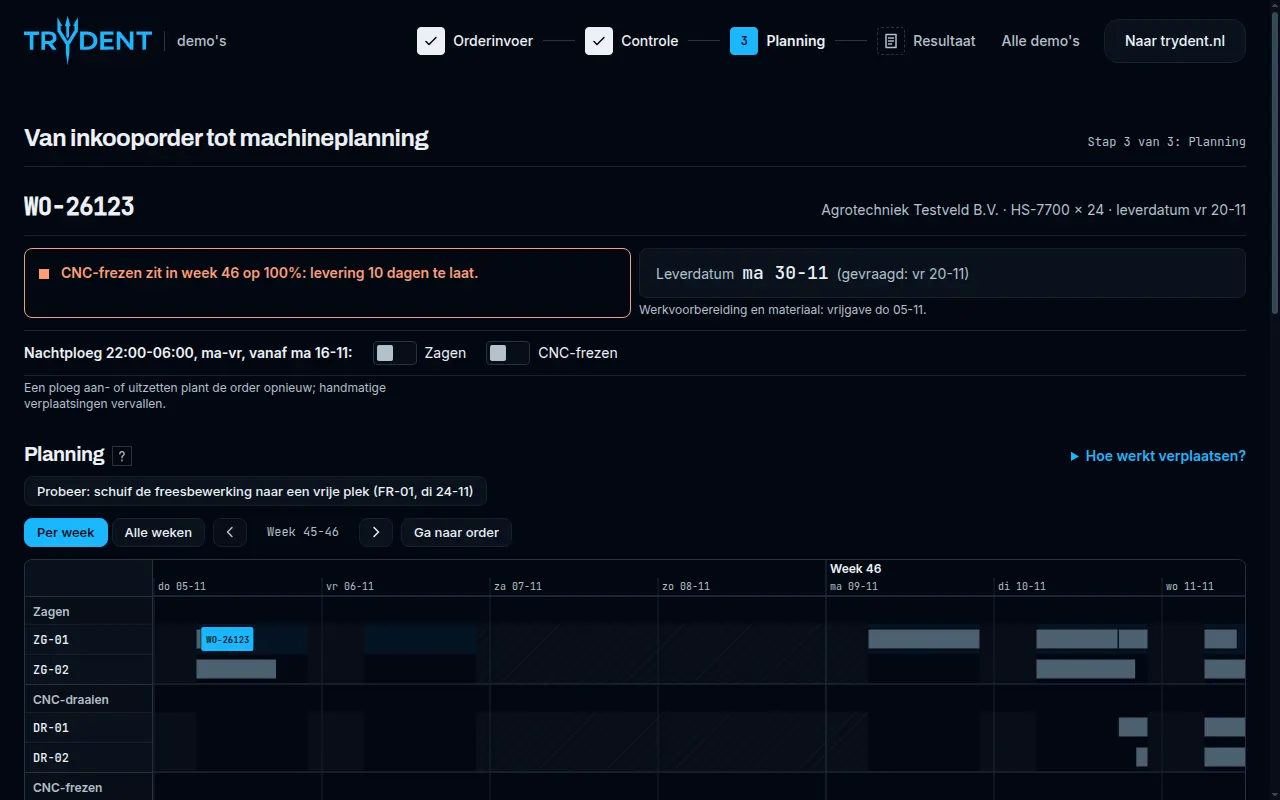
With finite capacity, the software schedules only what the machines can actually run in their shifts, next to the work already planned. An Excel schedule often just adds up hours and does not see that the milling machine is already full in week 46.
The demo schedules forward: operations follow the routing, each going to the machine in its group that finishes first. An operation may be split across shifts and gaps, on one machine and in parts of at least 30 minutes. Duration is setup time plus run time per piece times the quantity.
- Release: the order date plus three working days for preparation and material.
- Shifts: early 06:00–14:00 and late 14:00–22:00, Monday to Friday.
- Machines: eight machines in four groups (sawing, CNC turning, CNC milling, bending), with 22 open orders already scheduled.
- Load per machine per week: below 70 % green, up to 90 % orange, above that red.
Calculating the delivery date and finding the bottleneck
The delivery date is the end of the last operation. The demo compares it with the requested date and counts the days late. The bottleneck is the operation that waits longest for a free machine; the message names the machine group and its busiest week.
Then you can act: drag an operation to a free slot, or switch on a night shift for a machine group (22:00–06:00, from week 47). A move that cannot work, such as milling before sawing is done, is refused with the reason.
A worked example
The sample order in the demo: 24 HS-7700 hydraulic blocks, ordered on 2 November 2026 and requested in week 47, so Friday 20 November. The routing is sawing, then milling. All data is fictional.
| Step | Calculation | Result |
|---|---|---|
| Sawing | 15 min setup + 24 × 18 min | 447 min |
| Milling | 60 min setup + 24 × 40 min | 1020 min |
| Release | Order date + 3 working days | Thu 05-11 |
| No action | CNC milling at 100 % in week 46 | Mon 30-11, 10 days late |
| Night shift milling | Milling capacity from 80 to 120 hours per week per machine | Wed 18-11, on time |
With the night shift, milling peaks at 81 % instead of 100 % from week 47, and the order is ready before the requested date. That is exactly the trade-off an Excel schedule keeps out of sight.
What does it save?
The demo's last step works out an indication. At 40 orders a week and € 55 an hour, that is about 173 orders a month. Order entry going from 8 to 1 minute per order and re-planning rush orders (10 %) from 45 to 1 minute saves about 32.7 hours, or € 1,799 a month. You can change both numbers in the demo; it remains an indication based on common practice.
With your own orders, machines and ERP
The demo uses one fictional company with an Exact environment. Trydent builds this as custom software: order entry from your own PDFs and e-mails, your routings, machines and shifts, and a schedule that connects to the ERP you already use.
Frequently asked questions
- Do I need to upload my own order?
- No. The demo uses three fictional sample orders: a clean PDF, a scan with a handwritten delivery date and an order with several lines. Nothing is uploaded or stored; everything runs in your browser.
- Does the demo really read the PDF?
- No, in the demo the reading is simulated with fixed values per sample order. The check, the link to the routing and the scheduling are calculated for real.
- Why not just plan in Excel?
- Excel adds up hours, but does not know which machine is free when, in which order operations must run and what an extra shift does. Finite capacity scheduling works that out, so you see the delivery date and the bottleneck before you confirm the order.
Bring one real order
In a free 30-minute introductory call, Trydent looks at one of your own purchase orders and a slice of your planning with you, so you can see what this means for your business.
Book a free introductory call