Demo · Shop floor time tracking
Shop floor time tracking: hours per operation and job costing
On many shop floors, operators write their hours on a slip or a weekly sheet, and someone in the office types them in later. By then the order has often shipped, and nobody can see which operation took longer than planned. In the Shop floor time tracking demo, an operator clocks each operation on a tablet and the office sees the job costing straight away. The demo is in Dutch; this page explains how it works and what it calculates.
Explore freely · no login · fictional data · in Dutch
Why time sheets do not give you job costing
A time sheet usually says how many hours someone worked on an order, not on which operation and how many pieces are done. So you cannot fairly compare the booked hours with the standard: an order that is half finished always looks cheap. And because the hours reach the system days later, the schedule lags behind what actually happens on the floor.
Digital time tracking on the shop floor records the hours where they happen: per order, per operation and per machine, with the number of pieces done. Job costing then stops being an after-the-fact chore and becomes an overview that stays current.
On the shop floor: clocking on the tablet
In the demo you are a fictional operator. The demo is set on Wednesday 4 November, 12:00, and the demo clock runs 60 times as fast: one second is one minute.
- Pick the machine you are at, from the demo company's eight machines.
- Pick the operation: you see the open operations on that machine, with how many pieces are done and the standard in hours.
- Clock with Start, Pause, Resume and Stop. A +30 min (demo) button saves you the wait.
- At Stop you enter how many pieces were finished in this session. The booking counts in the job costing straight away.
In the office: job costing, planned against actual
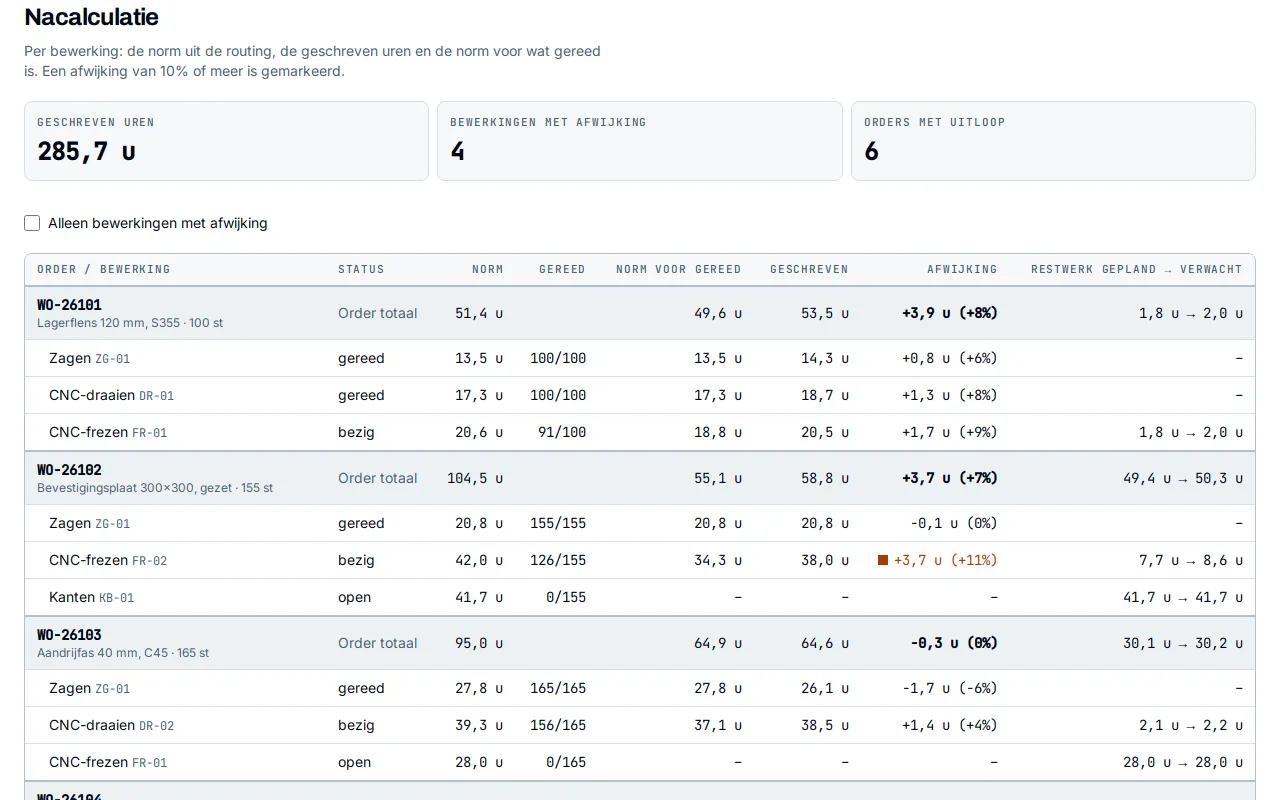
The job costing puts the standard next to the booked hours, per order and per operation. The standard comes from the routing: setup time plus time per piece times the quantity, the same formula the schedule uses. To compare a half-finished operation fairly, the demo uses the standard for what is done: setup time plus time per piece times the pieces done.
- Deviation: booked minus the standard for what is done. From 10 % over or under, the row is marked, and a filter shows only those rows.
- Remaining work: the standard for what is still open, and next to it the same at the pace measured so far. That pace is capped, so one short booking cannot derail the forecast.
- At the top: total hours booked, the number of operations with a deviation and the number of orders running over.
- Latest bookings: who booked how much time and how many pieces, on which machine and when.
A worked example from the job costing
Order WO-26102 in the demo: 155 mounting plates. Milling on FR-02 is in progress; at the demo moment 126 pieces are done. The routing gives 40 minutes setup and 16 minutes per piece. All data is fictional.
| Line | Calculation | Result |
|---|---|---|
| Standard | 40 min + 155 × 16 min | 42.0 h |
| Standard for done | 40 min + 126 × 16 min | 34.3 h |
| Booked | Time clocked on this operation | 38.0 h |
| Deviation | 38.0 h − 34.3 h | +3.7 h (+11 %) |
| Remaining work | 29 pieces × 16 min, then at the measured pace | 7.7 h → 8.6 h |
Without the standard for what is done, this operation would look under budget at 38.0 of 42.0 hours. With the pieces done taken into account, it runs 11 % over, and the demo expects almost an hour of extra remaining work.
Back into the schedule
When an operation runs over, the end of the order moves later. For each order in progress, the demo works out when it will be done at the measured pace, next to the planned finish and the delivery date, and links to the digital planning board. That way the schedule follows what actually happens on the floor, instead of what was expected last week.
In a real company
The demo uses fictional clock data and fictional employees. In a real company the orders, routings and standard times come from the ERP or the planning you already use, and the booked hours and completed quantities can go back there. How an operator signs in, which device is used for clocking and which integration with your system is possible, Trydent agrees per situation.
Trydent builds this as custom software: time tracking around your own operations and machines, reporting back into the job costing and the schedule you already have.
Frequently asked questions
- Is this time tracking for payroll?
- No. The demo is about hours per order and operation: what an operation really cost and what that means for the schedule. Attendance, leave and payroll are a different subject; your existing system can stay for those.
- What is job costing in production?
- Comparing afterwards what an order or operation should cost according to the standard with the hours that actually went into it. That shows which standard times are wrong and which orders cost more than calculated.
- Are the employees and hours in the demo real?
- No. The employees are called Medewerker 11 to 26, and the clock data is generated from a fixed seed, so everyone sees the same demo. Everything runs in your browser and nothing is stored.
- Does an operator have to clock in and out of every operation?
- In the demo, yes: start, pause and stop per operation, with the pieces done at Stop. What costs the least time in your workshop is something Trydent discusses with you and the people on the floor.
Bring a time sheet
In a free 30-minute introductory call, Trydent looks with you at how you book hours and cost jobs today. A filled-in time sheet often says enough.
Book a free introductory call